Automate SQL Server Agent job deployment without losing history
I hope you already have a CI/CD pipeline for database schema deployments. Today, I’d like to talk about automating SQL Server Agent job deployments. In my opinion, job definitions belong in source control, just like database schemas and other server objects.
The idea is simple: keep a T-SQL script for each job that defines its settings, steps, and schedules. Configure your CI/CD pipeline to deploy only the scripts that have changed since the previous deployment.
A straightforward approach is to:
- Check whether the job exists
- Drop it if it does
- Create it from scratch
However, the main disadvantage of this approach is that you lose all the job history. It’s not the end of the world, but I’d prefer to keep it if possible, as it can be very useful for investigating regressions.
Fortunately, you can preserve the job and update its definition instead. Rather than dropping the entire job, update its settings, remove its existing steps and schedules, and recreate them.
Take a look at this example script. The example is based on a job creation script generated by SSMS, with a few modifications.
Here’s what it does:
- Creates the job category if it doesn’t already exist
- Creates the job if it doesn’t exist, or updates its settings if it does
- Deletes existing step(s)
- Deletes existing schedule(s)
- Adds step(s)
- Adds schedule(s)
To start using that example as a template:
- Set values such as
job_nameanddescriptionat the top of the script - Modify the
adding step(s)section - Modify the
adding schedule(s)section - Adjust any other settings as needed to meet your environment’s requirements
This gives you a job definition you can version and deploy while preserving the job’s history. The script is designed to be idempotent: running it again applies the same job definition without creating a duplicate job.
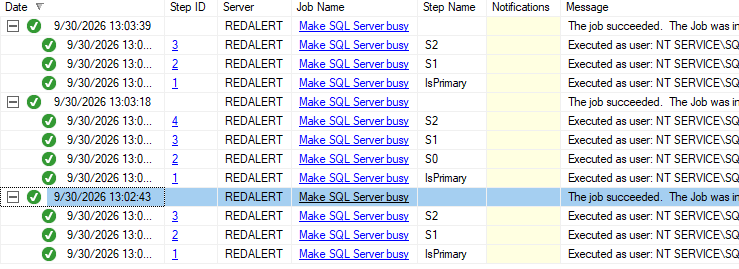
Imagine deploying the example job with two steps, modifying it manually, and then deploying it again, running the job after each change. The screenshot below shows that the job’s history is preserved, even for steps that no longer exist:
A couple of notes:
- This template does not support shared job schedules
- The
IsPrimarystep checks whether the current SQL Server instance hosts the primary replica of the relevant Always On availability group. Tweak or remove it as needed
Feel free to share your thoughts in the comments, either on LinkedIn or below.
Ci vediamo!