Batch delete/update script advanced version
Let’s try to improve our previous script and see what we can do to make it work more efficient.
Here is the final script snippet from the previous post:
1	delete  so
2	from	#todo t
3			inner loop join dbo.Votes so
4			on so.Id = t.primary_key_id
5	where t.row_id >= @current_row_id and t.row_id < @current_row_id + @batch_size
And the execution plan for it:
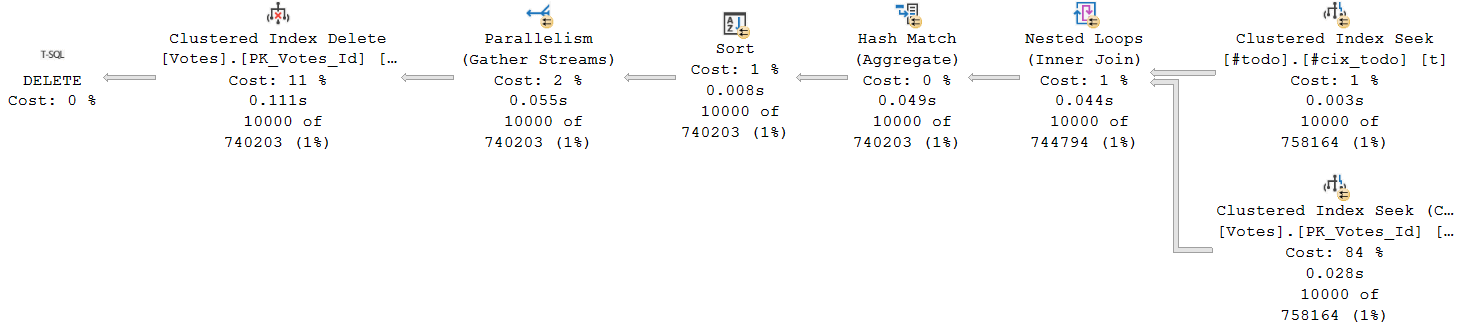 Do you see anything wrong in it?

Notice the cardinality estimates? They’re drifting somewhere far, far away from reality…
Do you know why? Feel free to tell me in the comments. Assuming I ever add those, of course.
Just kidding, we use local variables - that’s why.
A simple solution to fix that is to use option recompile. Here is the script:
 1use StackOverflow2013
 2go
 3set nocount, xact_abort on
 4set deadlock_priority low
 5
 6declare	@batch_size int = 10000,	-- set the batch size
 7	@current_row_id int = 1,
 8	@max_row_id int
 9
10-- It is very important to use an appropriate datatype for primary_key_id matching PK datatype
11create table #todo
12(
13	row_id			int identity(1, 1) not null,
14	primary_key_id	int not null
15)
16
17insert	#todo(primary_key_id)
18select	Id
19from	dbo.Votes
20where CreationDate < '2010-01-01'
21
22set @max_row_id = scope_identity()
23
24create unique clustered index #cix_todo on #todo(row_id) with(data_compression = page)
25
26while @current_row_id <= @max_row_id
27begin
28	-- I typically use a "loop join" because it often delivers the best performance,
29	-- but you should always test other join types or let SQL Server choose the optimal one
30	delete  so
31	from	#todo t
32			inner loop join dbo.Votes so
33			on so.Id = t.primary_key_id
34	where t.row_id >= @current_row_id and t.row_id < @current_row_id + @batch_size
35	option(recompile)
36
37	set @current_row_id = @current_row_id + @batch_size
38end
Look at the execution plan, it’s simplier and has accurate estimates. Easy!
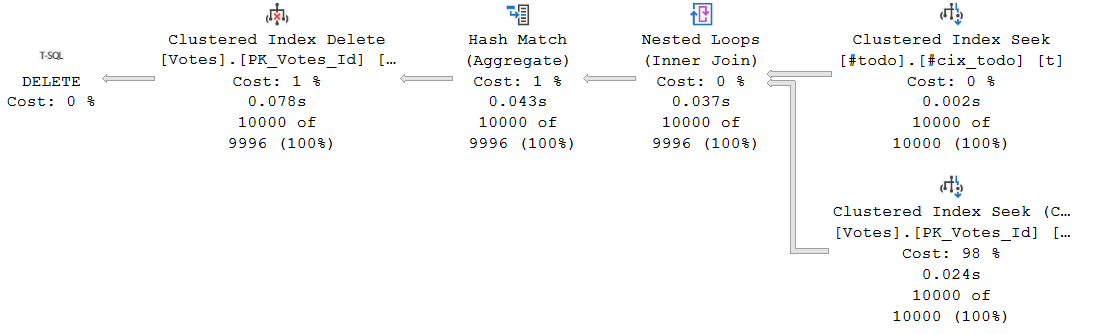 Notice that it’s serial and not parallel anymore. And total execution took around 38 seconds or 4 seconds faster than original query.
Remember the recompile option isn’t something you want to use on every query - especially in OLTP workloads - but for this specific case, it’s perfectly fine if you want an easy peasy and effective solution.
Anyway, there’s another option. Let’s give SQL Server a little hint by using the optimize for query option. Here is the new script:
 1use StackOverflow2013
 2go
 3set nocount, xact_abort on
 4set deadlock_priority low
 5
 6declare	@batch_size int = 10000,	-- set the batch size here and inside "optimize for"
 7	@current_row_id int = 1,
 8	@max_row_id int
 9
10-- It is very important to use an appropriate datatype for primary_key_id matching PK datatype
11create table #todo
12(
13	row_id			int identity(1, 1) not null,
14	primary_key_id	int not null
15)
16
17insert	#todo(primary_key_id)
18select	Id
19from	dbo.Votes
20where CreationDate < '2010-01-01'
21
22set @max_row_id = scope_identity()
23
24create unique clustered index #cix_todo on #todo(row_id) with(data_compression = page)
25
26while @current_row_id <= @max_row_id
27begin
28	-- I typically use a "loop join" because it often delivers the best performance,
29	-- but you should always test other join types or let SQL Server choose the optimal one
30	delete  so
31	from	#todo t
32			inner loop join dbo.Votes so
33			on so.Id = t.primary_key_id
34	where t.row_id >= @current_row_id and t.row_id < @current_row_id + @batch_size
35	option(optimize for(@batch_size = 10000, @current_row_id = 0))
36
37	set @current_row_id = @current_row_id + @batch_size
38end
I’m skipping the execution plan since it’s the same as the previous query. And total execution took around 35 seconds.
Using optimize for comes with pros and cons. You’ll get fewer recompiles(hopefully one) and likely better performance, but @batch_size stops being a true parameter, since its value must be hardcoded inside the hint.
In the end, it’s up to you to choose which approach best fits your scenario.
Adiós!