How to delete or update large amounts of data and avoid large transactions
I won’t bother explaining why this is necessary — you probably already know that trying to delete everything with one big delete statement is the fastest way to delete data, but it’s also the fastest way to get in trouble. Of course, I’m not talking about deleting a few hundred or even a thousand rows — I mean millions, or even hundreds of millions. And just to be clear, we’re not getting into table partitioning here.
For my tests I used StackOverflow2013 database. Here is our base query:
1use StackOverflow2013
2go
3set nocount, xact_abort on
4set deadlock_priority low
5
6delete	dbo.Votes
7where CreationDate < '2010-01-01'
There are ~4.6M rows and you want to delete all of them. On my “extremely powerful” Intel Pentium(yes, they still exist) N6005, the execution blazed through in just 23 seconds and used all 4 cores!
And here is the execution plan — as you can see, nothing too exciting here:

Here is batching script for that delete statement:
 1use StackOverflow2013
 2go
 3set nocount, xact_abort on
 4set deadlock_priority low
 5
 6declare	@batch_size int = 10000,	-- set the batch size
 7	@current_row_id int = 1,
 8	@max_row_id int
 9
10-- It is very important to use an appropriate datatype for primary_key_id matching PK datatype
11create table #todo
12(
13	row_id			int identity(1, 1) not null,
14	primary_key_id	int not null
15)
16
17insert	#todo (primary_key_id)
18select	Id
19from	dbo.Votes
20where CreationDate < '2010-01-01'
21
22set @max_row_id = scope_identity()
23
24create unique clustered index #cix_todo on #todo(row_id) with(data_compression = page)
25
26while @current_row_id <= @max_row_id
27begin
28	-- I typically use a "loop join" because it often delivers the best performance,
29	-- but you should always test other join types or let SQL Server choose the optimal one
30	delete  so
31	from	#todo t
32			inner loop join dbo.Votes so
33			on so.Id = t.primary_key_id
34	where t.row_id >= @current_row_id and t.row_id < @current_row_id + @batch_size
35
36	set @current_row_id = @current_row_id + @batch_size
37end
This one took 42 seconds. I will skip the execution plan for the insert statement, as it’s not crucial here. Only one thing, hopefully, in your case, you aren’t using read uncommitted isolation and are instead using the not-perfect but still much better snapshot isolation.
Here is the execution plan and yeah definetely it is more complex and still parallel:
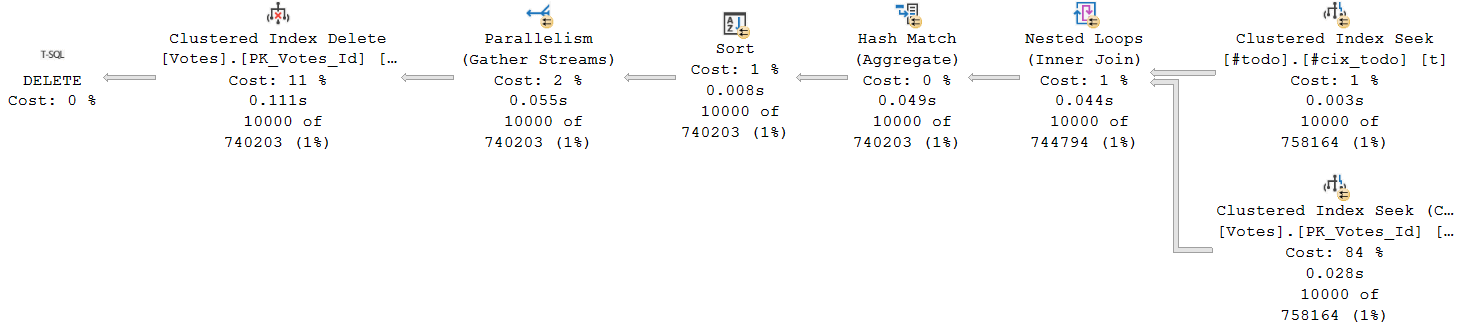
Such an approach has some disadvantages and may not work for all cases. For example, what if you want to temporarily stop this process? Here is another script that keeps tracking its current state:
 1use StackOverflow2013
 2go
 3set nocount, xact_abort on
 4set deadlock_priority low
 5
 6-- It is very important to use an appropriate datatype for primary_key_id matching PK datatype
 7create table #todo
 8(
 9	row_id			int identity(1, 1) not null,
10	primary_key_id	int not null
11)
12
13create table #state
14(
15	current_row_id	int not null,
16	max_row_id		int not null
17)
18
19insert	#todo (primary_key_id)
20select	Id
21from	dbo.Votes
22where CreationDate < '2010-01-01'
23
24insert	#state(current_row_id, max_row_id)
25values	(1, scope_identity())
26
27create unique clustered index #cix_todo on #todo(row_id) with(data_compression = page)
28go
29
30-- Delete cycle. Can be stopped and restarted at any time
31-- If the process is stopped, don't forget to roll back the transaction, as it may still be open
32declare	@batch_size int = 10000,	-- set the batch size
33	@current_row_id int = 1,
34	@max_row_id int
35
36select	@current_row_id = current_row_id,
37		@max_row_id = max_row_id
38from	#state
39
40while @current_row_id <= @max_row_id
41begin
42	begin try
43		begin tran
44		-- I typically use a "loop join" because it often delivers the best performance,
45		-- but you should always test other join types or let SQL Server choose the optimal one
46			delete  so
47			from	#todo t
48					inner loop join dbo.Votes so
49					on so.Id = t.primary_key_id
50			where t.row_id >= @current_row_id and t.row_id < @current_row_id + @batch_size
51
52			update	#state
53			set		current_row_id = @current_row_id + @batch_size
54		commit tran
55	end try
56	begin catch
57		if @@trancount > 0
58		begin
59			rollback transaction
60		end
61		;throw
62	end catch
63
64	set @current_row_id = @current_row_id + @batch_size
65end
There’s no difference in the execution plan, but this version includes additional logic and I/O overhead, which resulted in a 44-second execution time. I use this script for manual runs because it allows you to stop and resume it at any time. If you do stop it, don’t forget to roll back the transaction, as it may still be open.
Think that’s all? Nope — we can still do more with those queries. Stay tuned!