Parsing XML in SQL Server: Back to the Roots
XML has been around for roughly 30 years. SQL Server has had native XML support for more than 20 of them, starting with SQL Server 2005. You might think that by 2026, optimizing XML parsing in SQL Server would be a topic safely left in the past.
Well… here we are.
Recently, I found myself investigating optimization options for an ancient application that relies heavily on parsing XML data.
Let’s not discuss why that application uses an expensive SQL Server instance to parse XML, or why this “t-sql-application” was never refactored to process XML on the application side instead.
It is what it is. Let’s just see what we can improve without changing this paradigm.
Today I compared two approaches to turning XML data into relational rows:
Preparation
For testing, I used the StackOverflow2013 database. First, I generated three XML documents containing 10, 100, and 1,000 Posts, respectively, and stored them in a table:
 1use StackOverflow2013
 2go
 3create table dbo.xml_storage
 4(
 5	row_count	int not null,
 6	[value]		xml not null
 7)
 8go
 9
10insert	dbo.xml_storage(row_count, [value])
11select	10 row_count,
12		(
13		select top (10)
14				Id,
15				AcceptedAnswerId,
16				AnswerCount,
17				Body,
18				ClosedDate,
19				CommentCount,
20				CommunityOwnedDate,
21				CreationDate,
22				FavoriteCount,
23				LastActivityDate,
24				LastEditDate,
25				LastEditorDisplayName,
26				LastEditorUserId,
27				OwnerUserId,
28				ParentId,
29				PostTypeId,
30				Score,
31				Tags,
32				Title,
33				ViewCount
34		from	dbo.Posts
35		for xml path('Post'), root('Posts'), type
36	)
37union all
38select	100 row_count,
39		(
40		select top (100)
41				Id,
42				AcceptedAnswerId,
43				AnswerCount,
44				Body,
45				ClosedDate,
46				CommentCount,
47				CommunityOwnedDate,
48				CreationDate,
49				FavoriteCount,
50				LastActivityDate,
51				LastEditDate,
52				LastEditorDisplayName,
53				LastEditorUserId,
54				OwnerUserId,
55				ParentId,
56				PostTypeId,
57				Score,
58				Tags,
59				Title,
60				ViewCount
61		from	dbo.Posts
62		for xml path('Post'), root('Posts'), type
63	)
64union all
65select	1000 row_count,
66		(
67		select top (1000)
68				Id,
69				AcceptedAnswerId,
70				AnswerCount,
71				Body,
72				ClosedDate,
73				CommentCount,
74				CommunityOwnedDate,
75				CreationDate,
76				FavoriteCount,
77				LastActivityDate,
78				LastEditDate,
79				LastEditorDisplayName,
80				LastEditorUserId,
81				OwnerUserId,
82				ParentId,
83				PostTypeId,
84				Score,
85				Tags,
86				Title,
87				ViewCount
88		from	dbo.Posts
89		for xml path('Post'), root('Posts'), type
90	)
91go
The resulting XML document sizes were:
14,124bytes for 10 Posts175,524bytes for 100 Posts1,703,786bytes for 1,000 Posts
Next I created two stored procedures to test those options:
  1use StackOverflow2013
  2go
  3create or alter procedure dbo.stp_nodes_n_values
  4(
  5	@row_count	int
  6)
  7as
  8set nocount on
  9
 10declare @x xml
 11declare @t table
 12(
 13	Id					int not null,
 14	AcceptedAnswerId	int null,
 15	AnswerCount			int null,
 16	Body				nvarchar(max) not null,
 17	ClosedDate			datetime null,
 18	CommentCount		int null,
 19	CommunityOwnedDate	datetime null,
 20	CreationDate		datetime not null,
 21	FavoriteCount		int null,
 22	LastActivityDate	datetime not null,
 23	LastEditDate		datetime null,
 24	LastEditorDisplayName   nvarchar(40),
 25	LastEditorUserId	int null,
 26	OwnerUserId			int null,
 27	ParentId			int null,
 28	PostTypeId			int not null,
 29	Score				int not null,
 30	Tags				nvarchar(150) null,
 31	Title				nvarchar(250) null,
 32	ViewCount			int not null
 33)
 34
 35select top 1 @x = [value]
 36from	dbo.xml_storage
 37where row_count = @row_count
 38
 39insert	@t
 40select	P.X.value('(Id/text())[1]', 'int') Id,
 41		P.X.value('(AcceptedAnswerId/text())[1]', 'int') AcceptedAnswerId,
 42		P.X.value('(AnswerCount/text())[1]', 'int') AnswerCount,
 43		P.X.value('(Body/text())[1]', 'nvarchar(max)') Body,
 44		P.X.value('(ClosedDate/text())[1]', 'datetime') ClosedDate,
 45		P.X.value('(CommentCount/text())[1]', 'int') CommentCount,
 46		P.X.value('(CommunityOwnedDate/text())[1]', 'datetime')	CommunityOwnedDate,
 47		P.X.value('(CreationDate/text())[1]', 'datetime') CreationDate,
 48		P.X.value('(FavoriteCount/text())[1]', 'int') FavoriteCount,
 49		P.X.value('(LastActivityDate/text())[1]', 'datetime') LastActivityDate,
 50		P.X.value('(LastEditDate/text())[1]', 'datetime') LastEditDate,
 51		P.X.value('(LastEditorDisplayName/text())[1]', 'nvarchar(40)') LastEditorDisplayName,
 52		P.X.value('(LastEditorUserId/text())[1]', 'int') LastEditorUserId,
 53		P.X.value('(OwnerUserId/text())[1]', 'int') OwnerUserId,
 54		P.X.value('(ParentId/text())[1]', 'int') ParentId,
 55		P.X.value('(PostTypeId/text())[1]', 'int') PostTypeId,
 56		P.X.value('(Score/text())[1]', 'int') Score,
 57		P.X.value('(Tags/text())[1]', 'nvarchar(150)') Tags,
 58		P.X.value('(Title/text())[1]', 'nvarchar(250)') Title,
 59		P.X.value('(ViewCount/text())[1]', 'int') ViewCount
 60from	@x.nodes('/Posts/Post') as P(X)
 61go
 62
 63create or alter procedure dbo.stp_openxml
 64(
 65	@row_count	int
 66)
 67as
 68set nocount on
 69
 70declare @x xml, @hdoc int
 71declare @t table
 72(
 73	Id					int not null,
 74	AcceptedAnswerId	int null,
 75	AnswerCount			int null,
 76	Body				nvarchar(max) not null,
 77	ClosedDate			datetime null,
 78	CommentCount		int null,
 79	CommunityOwnedDate	datetime null,
 80	CreationDate		datetime not null,
 81	FavoriteCount		int null,
 82	LastActivityDate	datetime not null,
 83	LastEditDate		datetime null,
 84	LastEditorDisplayName   nvarchar(40),
 85	LastEditorUserId	int null,
 86	OwnerUserId			int null,
 87	ParentId			int null,
 88	PostTypeId			int not null,
 89	Score				int not null,
 90	Tags				nvarchar(150) null,
 91	Title				nvarchar(250) null,
 92	ViewCount			int not null
 93)
 94
 95select top 1 @x = [value]
 96from	dbo.xml_storage
 97where row_count = @row_count
 98
 99begin try
100	exec sys.sp_xml_preparedocument @hdoc output, @x
101
102	insert	@t
103	select	Id,
104			AcceptedAnswerId,
105			AnswerCount,
106			Body,
107			ClosedDate,
108			CommentCount,
109			CommunityOwnedDate,
110			CreationDate,
111			FavoriteCount,
112			LastActivityDate,
113			LastEditDate,
114			LastEditorDisplayName,
115			LastEditorUserId,
116			OwnerUserId,
117			ParentId,
118			PostTypeId,
119			Score,
120			Tags,
121			Title,
122			ViewCount
123	from	openxml(@hdoc, '/Posts/Post', 2)
124	with
125	(
126		Id					int,
127		AcceptedAnswerId	int,
128		AnswerCount			int,
129		Body				nvarchar(max),
130		ClosedDate			datetime,
131		CommentCount		int,
132		CommunityOwnedDate	datetime,
133		CreationDate		datetime,
134		FavoriteCount		int,
135		LastActivityDate	datetime,
136		LastEditDate		datetime,
137		LastEditorDisplayName   nvarchar(40),
138		LastEditorUserId	int,
139		OwnerUserId			int,
140		ParentId			int,
141		PostTypeId			int,
142		Score				int,
143		Tags				nvarchar(150),
144		Title				nvarchar(250),
145		ViewCount			int
146	)
147
148	exec sys.sp_xml_removedocument @hdoc
149	set @hdoc = null
150end try
151begin catch
152	if @hdoc is not null
153	begin
154		exec sys.sp_xml_removedocument @hdoc
155		set @hdoc = null
156	end
157	;throw
158end catch
159go
Everything is ready. Let’s run the tests!
Testing
For the testing I used latest and greatest Microsoft SQL Server 2025 (RTM-CU7).
The ancient application uses nodes() and value() to extract XML data. The code is shorter, simpler, and modern — by SQL Server 2005 standards, anyway. That’s where I started.
Here is its execution plan:

Huge, huh?
The SELECT statement extracts 20 columns. In this plan, repeated XML value extraction produces a series of branches connected by Nested Loops operators:

The execution plan for OPENXML:
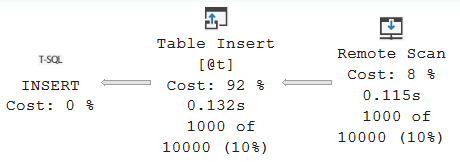
The OPENXML insert has a much smaller visible plan: a Remote Scan feeding the table variable insert.
Next I ran each stored procedure 1,000 times for each document size using SqlQueryStress. Here is the query I used to collect procedure execution statistics:
 1use StackOverflow2013
 2go
 3select	object_name(ps.[object_id], ps.database_id) proc_name,
 4		ps.execution_count execution_cnt,
 5		cast(ps.total_elapsed_time * 1.0 / ps.execution_count / 1000 as decimal(18, 2)) avg_duration_ms,
 6		cast(ps.total_worker_time * 1.0 / ps.execution_count / 1000 as decimal(18, 2)) avg_cpu_ms,
 7		cast(ps.total_logical_reads * 1.0 / ps.execution_count as decimal(18, 2)) avg_logical_reads,
 8		cast(ps.total_logical_writes * 1.0 / ps.execution_count as decimal(18, 2)) avg_logical_writes
 9from	sys.dm_exec_procedure_stats ps
10where ps.database_id = db_id()
11	and ps.[object_id] in
12	(
13		object_id('dbo.stp_nodes_n_values'),
14		object_id('dbo.stp_openxml')
15	)
16go
Here are stats for 10 Posts:
proc_name |
avg_duration_ms |
avg_cpu_ms |
avg_logical_reads |
avg_logical_writes |
|---|---|---|---|---|
stp_nodes_n_values |
4.17 |
4.16 |
61.01 |
0.00 |
stp_openxml |
3.58 |
3.54 |
69.01 |
0.00 |
For 100 Posts:
proc_name |
avg_duration_ms |
avg_cpu_ms |
avg_logical_reads |
avg_logical_writes |
|---|---|---|---|---|
stp_nodes_n_values |
32.17 |
32.16 |
986.52 |
13.99 |
stp_openxml |
24.04 |
23.99 |
2209.03 |
38.13 |
And for 1,000 Posts:
proc_name |
avg_duration_ms |
avg_cpu_ms |
avg_logical_reads |
avg_logical_writes |
|---|---|---|---|---|
stp_nodes_n_values |
341.53 |
341.40 |
21095.55 |
218.70 |
stp_openxml |
249.42 |
249.26 |
27809.49 |
1031.85 |
Based on these tests, OPENXML showed lower execution time and lower CPU consumption in all three cases. Very interesting! And to be honest, I didn’t expect that result.
Conclusion and notes
For these particular tests, my main goal was to compare the processing performance of the two XML parsing approaches - specifically, how long each one takes to process the same XML workload and how much CPU it consumes while doing so. For that reason, I focused on duration_ms and cpu_ms and excluded logical_reads and logical_writes from the comparison, as they weren’t particularly important for what I wanted to measure.
As you can see, OPENXML was faster than nodes() and value() across all three document sizes. Average duration and CPU time decreased by roughly 15–27%. For an application that repeatedly extracts many columns from XML to process them, those savings could add up.
That doesn’t make OPENXML the best choice for every XML workload. These tests covered a single document structure and 20 extracted columns. Different inputs may produce different results, so measure the performance for your specific case before making the switch.
Two magic numbers and a few other points are worth mentioning:
- For
OPENXMLcardinality estimation is always 10,000 for SQL Server 2022/2025 - For
nodes()andvalue()cardinality estimation is always 1,188 for SQL Server 2022/2025 - On SQL Server 2016, I also encountered an
ExcessiveGrantwarning when usingOPENXML. Check the actual execution plan for memory-grant warnings when testing your workload. However, I didn’t see the same warning on SQL Server 2022/2025 and I’m not sure about other versions - When using
OPENXML, release the document prepared by sp_xml_preparedocument with sp_xml_removedocument as soon as processing finishes, including when an error occurs. This frees the memory held by the prepared document
In my opinion, XML, JSON, and similar data formats are generally better, cheaper and more efficiently parsed on the application side, allowing SQL Server to work with already structured data and focus on relational operations such as insert, update, and delete. That said, there are certainly cases where parsing data directly in SQL Server is practical or unavoidable, especially when working with legacy applications or existing architectures.
Feel free to share your thoughts in the comments, either on LinkedIn or below.
Bis dann!